The tray icon
AltTab has no window of its own when it is idle — it lives in the notification area.
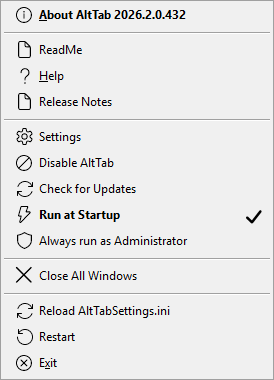
| About AltTab | Version, build, and a Copy details button for bug reports. Also Shift+F1. |
| ReadMe, Help, Release Notes | The three documents shipped beside the executable. Help is this document; F1 opens it too. |
| Settings | The Settings dialog. Also F2. |
| Disable AltTab | Turns the hotkeys off without exiting. See below. |
| Check for Updates | Asks now, whatever [General] CheckForUpdates says. |
| Run at Startup | Registers a scheduled task so AltTab starts with Windows. |
| Always run as Administrator | The same task, with highest privileges, so the hotkeys reach elevated windows. See troubleshooting. |
| Close All Windows | Every window in the list. Asks first. |
| Reload AltTabSettings.ini | Re-read the file. Only needed if the automatic reload has not noticed; AltTab watches the file. |
| Restart, Exit |
Two click gestures
| Single click | Opens the switcher. |
| Double click | Toggles Disable AltTab. |
One button with two gestures has an awkward consequence worth explaining, because it is visible: Windows delivers a double click as click, double-click — the first click arrives before the second exists. So the single click's "open the switcher" waits for the system's double-click time before acting, and a second click cancels it. That means a tray click opens the switcher a fraction of a second later than you pressed it.
The alternative — open immediately, toggle on the second click — shows the switcher for a few hundred milliseconds and then disables the application, which reads as a glitch. The tray icon is the switcher's secondary way in, so the small delay is the better trade.
Disabled
Disable AltTab is for the times something else needs Alt+Tab — a remote desktop session, a game, a recording.
While it is disabled:
- The hotkeys do nothing. The keyboard hook is removed, so AltTab is not even looking.
- A click on the tray icon does not open the switcher either. It is off, not merely quiet.
- A switcher already on screen closes, since the gesture that opened it no longer works.
- The tray icon goes grey and its tooltip gains "(disabled)" — the only evidence you get, so it is worth knowing what to look for.
Double-click the icon, or use the menu item, to bring it back.
It is not remembered.
DisableAltTablives only for the session: it is never written to the INI, and restarting AltTab — or reloading the settings file — comes back enabled.
Hiding the icon
[General] SystemTrayIconEnabled removes it. The hotkeys keep working, but with no icon there is no menu and no way to reach the settings except F2 in the switcher, so know that gesture before you turn it off.