Hotkeys and keys
The three gestures
AltTab answers three combinations, all of them configurable:
| Default | Name in the dialog | What it does |
|---|---|---|
| Alt+Tab | Switch between all windows | Every window, most recently used first. |
| Alt+` | Switch within one application | Only the windows of the application you are in. The ` key is the one above Tab on a US keyboard. See switching within one application. |
| Ctrl+Alt+Tab | Switch, and stay open | Opens the switcher and leaves it up when you let go of the modifiers. |
All three work the same way: hold the modifier, tap the key to move through the list, release the modifier to commit. Holding Shift as you tap reverses the direction — unless the combination itself contains Shift, in which case it has no reverse.
Each one can be turned off on its own without giving up the others.
Your own switchers
F2 → Hotkeys has three more rows, Your switcher 1 to 3, each a hotkey with a filter of its own. They are off until you tick them; their combinations default to Alt+1, Alt+2 and Alt+3 (not Ctrl+Alt, which is AltGr on many keyboards).
| Filter | What that switcher lists |
|---|---|
| All windows | Everything Alt+Tab lists. |
| This monitor only | The windows on the monitor the switcher opens on. |
| Other applications | Everything except the application in front, and anything grouped with it. |
| Under the pointer | Every window the mouse pointer is over, stacked or not. |
| Minimized only | Minimized windows. |
| Every desktop | Windows on every virtual desktop, whatever the desktop setting says. |
They behave exactly like Alt+Tab once open: hold, tap, release. The filter lasts only for that one appearance.
A short delay before it appears
[General] ShowDelayMs, the Show delay slider on the Hotkeys page, 0–1000 ms, default 0. With a delay, a quick Alt+Tab tap swaps to the previous window without the list ever being drawn, which is what Windows' own switcher does. Hold the keys a little longer and it appears; typing a search character makes it appear at once. The stays-open hotkey and the tray click are never delayed — there is no release to wait for, so a delay there would only be lag.
When the hotkeys stand aside
On the Processes page, under Applications that keep Alt+Tab:
- When a full-screen application is in front — a game, a presentation, a video — AltTab's hotkeys pass straight through to it. A full-screen window is one covering its whole monitor; a maximized window does not count.
- When one of these applications is in front — Remote Desktop (
mstsc.exe) and Hyper-V's console (vmconnect.exe) by default — so Alt+Tab reaches the remote or virtual machine instead. Add others with From window… or Add….
Both are off by default. The key is passed on unchanged, so Windows and the application get exactly what they would have had with no AltTab running.
Changing them
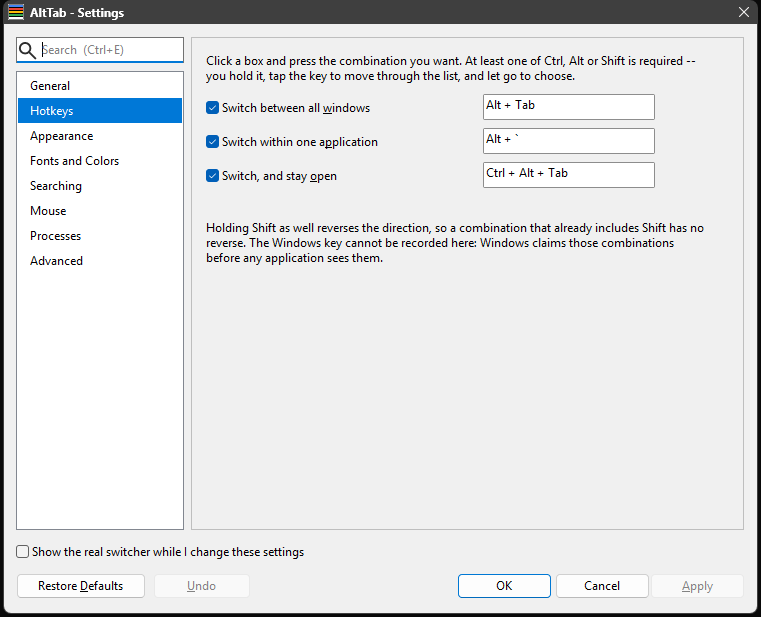
F2 → Hotkeys. Click a recorder box and press the combination you want; it shows what it captured. Two rules are enforced:
- Every hotkey needs at least one of Ctrl, Alt or Shift. The gesture is hold-tap-release, so a bare key would have nothing to release. The dialog says so rather than accepting it.
- Two enabled hotkeys set to the same combination are called out, in red, naming both and saying that only one of them can respond. It is a warning rather than a refusal — you can apply it — but the one you meant may not be the one that answers.
Combinations must match exactly, not merely contain what is asked for. That is what lets Alt+Tab and Ctrl+Alt+Tab coexist: with both modifiers held only the second one matches. It also means a hotkey using more modifiers is not shadowed by a simpler one.
While a box is recording, AltTab's own hotkeys stand down — otherwise pressing Alt+Tab to record it would open the switcher instead.
Upgrading from an older version. The three combinations live under new keys (
AltTab,AltBacktick,AltCtrlTab) in[Hotkeys]. A file written by an older build has none of them, so the defaults apply — except that a custom backtick key from the supersededBacktickKeyis carried over intoAltBacktick, so a non-US keyboard's setting is not lost.BacktickKeyis still read and no longer written.
Keys inside the switcher
These work however the switcher was opened.
| Key | What it does |
|---|---|
| Tab / Shift+Tab | Next / previous row. (Whatever key your hotkey uses.) |
| ↓ / ↑ | Next / previous row. In the icons view they move a whole grid row — or one icon, when every icon is on one row. |
| ← / → | In the icons view, the next / previous icon. In the list, with one row per application on and nothing typed, → shows the selected application's windows and ← folds them away. Otherwise they belong to the search box's caret. |
| Home or Page Up | First row. |
| End or Page Down | Last row. |
| Enter | Activate the selected window. |
| 1–9 | With row numbers on, activate that row — only while nothing has been typed. |
| Ctrl+M / Ctrl+X / Ctrl+R | Minimize the selected window (the switcher stays open) / maximize it / restore it to its ordinary size. |
| Ctrl+O | Go to the selected window on the next monitor. A maximized window stays maximized. |
| Ctrl+N | Run a new copy of its program — at your own level, even when AltTab is elevated. |
| Ctrl+Q | Quit the application: every one of its windows is asked to close. |
| Ctrl+W | Close the selected window, as Delete does. |
| Escape | Close the switcher without switching. With the context menu open it closes the menu instead and the switcher stays as it was. |
| Delete | Close the selected window. |
| Shift+Delete | End the selected window's process. |
| Apps (the menu key, next to right Ctrl) | Open the context menu on the selected window — everything Delete and the mouse can do, without the mouse. |
| ` / Shift+` | Jump to the next / previous window of the same application, wherever it is in the list. |
| Letters, digits, punctuation | Filter the list. See finding a window. |
| Backspace | Delete the last character of the filter. Ctrl+Backspace deletes the last word. |
| Ctrl+A | Select the whole filter, so the next character replaces it. |
| F1 | This help. Shift+F1 shows the version instead. |
| F2 | The Settings dialog. |
| Mouse wheel | Scroll the list — or, with [MouseHover] WheelSelects on, move the selection a row per notch. |
| Middle click | Close the window under the pointer. Shift+middle-click ends its process. |
Alt is still held while you do all of this, which is why the letters filter instead of triggering menus in the window behind. AltTab swallows those keystrokes and hands them to its own search box.
From the command line
A running AltTab can be asked to do three things by starting AltTab.exe again with a switch. The second process does nothing of its own: it asks the running one, prints the answer and exits.
AltTab.exe --show | Open the switcher, as a click on the tray icon does. |
AltTab.exe --list | Print the windows a fresh Alt+Tab would list, numbered, with each one's process. |
AltTab.exe --focus 3 | Switch to row 3 of that list. |
The exit code is 0 when it worked, 1 when no AltTab is running, and 2 for a bad argument. It works against an elevated AltTab from a console that is not elevated.
When a hotkey does nothing
The usual cause is that the window in front is running elevated and AltTab is not: a normal process cannot see keystrokes destined for an administrator's window. Run AltTab elevated too — Always run as Administrator in the tray menu — and it works everywhere. Troubleshooting has the rest.