Finding a window
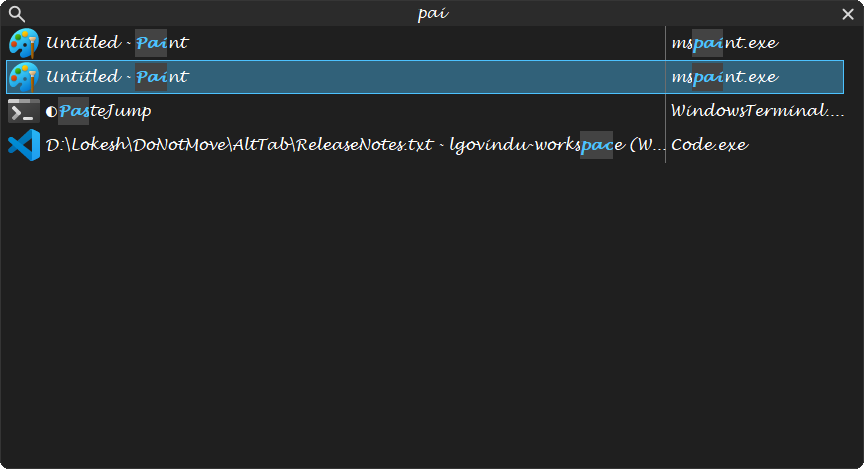
Open the switcher and start typing. You do not have to click the search box first, and you do not have to let go of Alt. The list narrows to matching windows and the letters that matched are highlighted, in both the title and the process name, so you can see why a row is there.
A match is looked for in the window's title and in its executable name, so chrome finds every Chrome window and invoice finds the document.
Several words
The filter is split on spaces and every part has to match — not necessarily next to each other, and not necessarily in the same column. paint unt matches Untitled - Paint. It is the quickest way to narrow two similar titles apart.
Smart search
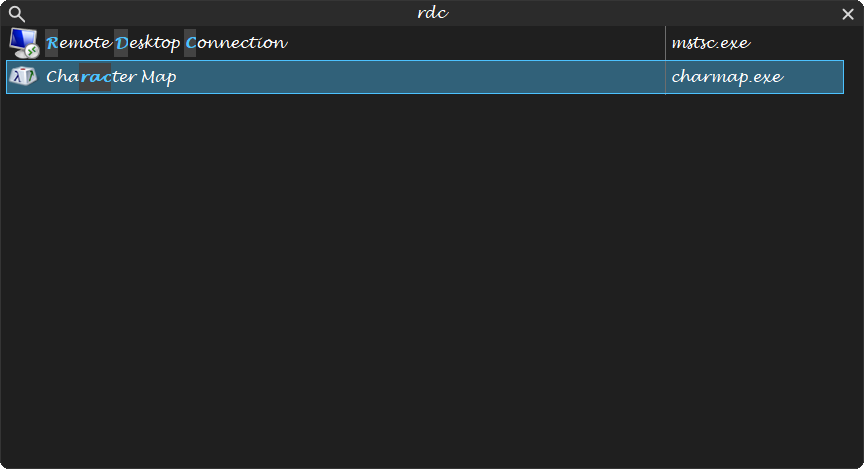
[General] SmartSearch, on the Searching page, off by default. Three things change while it is on:
- Initials match.
rdcfinds Remote Desktop Connection,vscfinds Visual Studio Code — the first letters of the title's words, in order. Those letters are highlighted. - The best matches come first. A title that starts with what you typed, then one with a word that does, then initials, then a match anywhere, then a fuzzy one.
- It learns what you pick. Choosing a window after typing remembers that search; the next time you type it, that window comes first. Kept in
%LOCALAPPDATA%\AltTab\LearnedPicks.txt, a few hundred lines at most.
Choosing a row by its number
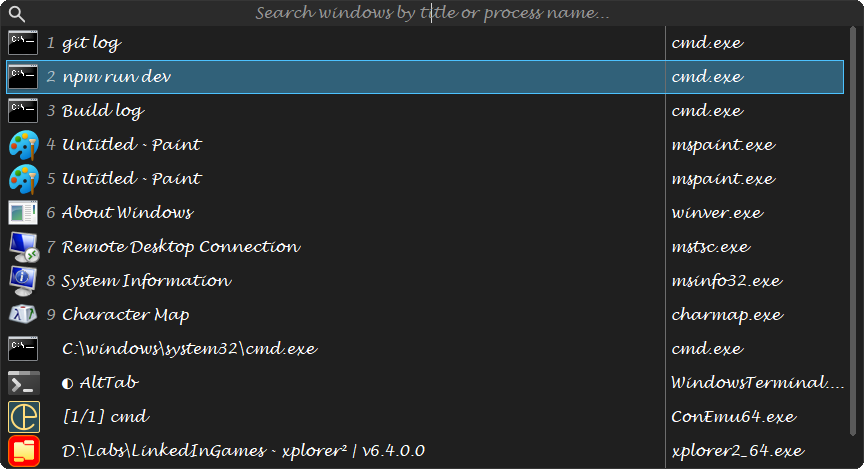
[ListView] QuickPickNumbers, on the Searching page, off by default. The first nine rows are numbered, and pressing a digit — on the top row or the number pad, with Alt still held — switches to that row at once. Only while nothing has been typed: after that a digit is part of the search, as you would expect.
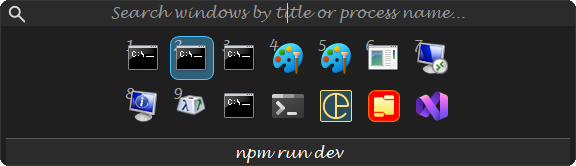
The icons view numbers its cells the same way, in each cell's corner:
How close a match has to be
[SearchString] FuzzyMatchPercent, on the Searching page, decides how approximate a match may be:

| Value | Effect |
|---|---|
| 100 | Exact matching only: the letters you typed have to appear, in that order, as they are. |
| 80 | files matches filas; a typo or a transposition still finds the window. |
| 60 | The default. Forgiving enough that half-remembered names work. |
| Lower still | Progressively more rows that are not what you meant. |
Below 100 AltTab uses approximate string matching, which costs more than a plain search — it is measured against every window's title on every keystroke. On a normal number of windows this is not noticeable; with a hundred windows open and a very low percentage, it can be.
Keeping the switcher open while you type
[General] KeepOpenWhileTyping, on the Searching page. Off by default.
Left off, the gesture never changes shape: hold, tap, release, and letting go activates the selected window whether or not you have typed. That is what most people expect from something that replaces Alt+Tab, which is why it is the default.
Turned on, the switcher becomes sticky the moment there is search text. Hold-and-tap-and-release suits picking a window two rows down; it does not suit typing a name, where you would have to hold Alt steady throughout and let go at exactly the right moment. So with this on, as soon as a keystroke becomes search text, releasing the modifiers stops committing and the switcher waits for a deliberate choice instead:
| Enter | Activate the selected row. |
| A click | The same. |
| Escape | Give up; nothing is switched. |
| Activating another window | Closes the switcher, as it always does. |
Releasing the modifiers without having typed still commits, even with the setting on. Only typing changes it, and only while it is on.
AltTab.NET has the same setting, under the same name and section and with the same default, so one AltTabSettings.ini means the same thing to both.
Backspace deletes the last character, and the × button in the search box clears the whole filter. Clearing it brings the full list back. While there is anything in the box the switcher does not shrink, so a narrowed list can leave an empty strip under the last row — deleting a character makes the list longer again, and a window resizing on every keystroke would move the rows you are reading. Clear the box and the size follows the list again. See The switcher.