Closing and terminating
You can get rid of a window from the switcher without switching to it first. There are two different things you might mean, and AltTab keeps them apart.
| Close | Terminate | |
|---|---|---|
| Gesture | Delete, the × on a row, a middle click, or Close in the context menu | Shift+Delete, Shift+click the ×, Shift+middle-click, or Terminate in the menu |
| What it does | Asks the window to close, the same as clicking its own close button | Ends the process outright |
| Unsaved work | The application can prompt you, and can refuse | Lost. Nothing is asked and nothing is saved |
| Other windows of that process | Unaffected | Go with it |
Close is what you want almost always. Terminate is for an application that has stopped responding — which the switcher shows you, by giving a row that is not responding its own background colour.
Doing it without leaving the switcher
Closing a window leaves the switcher open, so several can be dealt with one after another. The row fades and slides out as its window goes, over [General] RowCloseAnimationMs (default 100 ms, 0 for no animation) — long enough to see which row went, which matters when you are closing several.
A row only fades once the close was really issued. If it could not be — terminating a process owned by another account fails, for instance — the row stays as it is rather than pretending something happened.
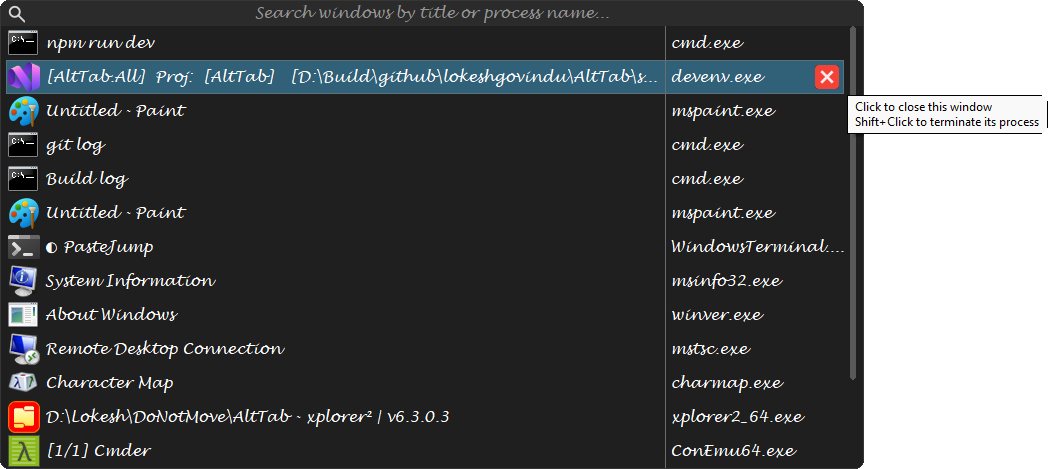
The × appears on the row under the pointer when [MouseHover] ShowDeleteButton is on. It is worked out from where the row is at the moment you click, not from where it was drawn, so scrolling with the wheel and then clicking cannot close a window you were not pointing at.
A middle click does the same to whatever is under the pointer, which is the convention browsers and taskbars already follow, and Shift+middle-click terminates. It is decided from where the pointer is when you let the button go, so dragging off before releasing changes your mind — and it is worth more in the icons view, which has no close button, than in the list.
Every window of one application
Quit the Application (Ctrl+Q, or the context menu) asks every window of the selected window's application to close — not only the rows a search left showing — so the application can save and go the way it would from its own File → Exit. Nothing is killed.
Terminate the Process Tree, in the context menu, ends the process and every process it started — a build that spawned compilers, a terminal and what is running in it. It asks first, and No is the default, because it reaches processes that have no row in the list.
All of them at once
Close All and Terminate All, in the row's context menu or the tray menu, apply to every window in the list — the list as filtered, so typing a name first is how you close one application's windows and nothing else.
Both ask for confirmation first. [General] PromptTerminateAll turns the question off if you would rather it did not ask; Terminate All without a prompt is worth thinking about before you switch it off.
When it does not work
A window owned by an elevated process cannot be closed or terminated by a process that is not elevated. Windows refuses it, AltTab reports nothing happened, and the row stays. Run AltTab elevated (Always run as Administrator in the tray menu) if you need this for administrator windows.
Some windows also simply decline to close — a document with unsaved changes, a modal dialog waiting for an answer. That is the application's decision, and Close respecting it is the point of the distinction on this page.